
What is a hotel room setup standard?
It is the written and visual specification of a ready room. For each room category it lists the items that belong in the room, where each item goes, how many there are and how to check them. Brand standards usually say what must be present. A room setup standard shows it, so a new room attendant, a trainer and an inspector all compare the room against the same reference.
It sits between the brand standard and the SOP. The brand standard sets the expectation, the SOP explains the work, and the setup record shows the result. Our guide to writing brand standards covers the first of these.
Why do photos for each room category matter?
Words leave room for interpretation. “Two pillows on the bed, decorative cushion centred” is read differently by every team. A photo settles it in a second, and it works across languages, which helps in hotels where teams speak several.
Each room category needs its own photos because the rooms differ:
- King rooms have one bed, one bedside layout and often a desk. The photo defines the bed dressing and what sits on each side.
- Twin rooms have two beds, so the standard must say how the two are dressed and how the space between them is used. A king photo cannot show this.
- Suites add a living area, extra seating and often more amenities. They need photos of each zone, not one view.
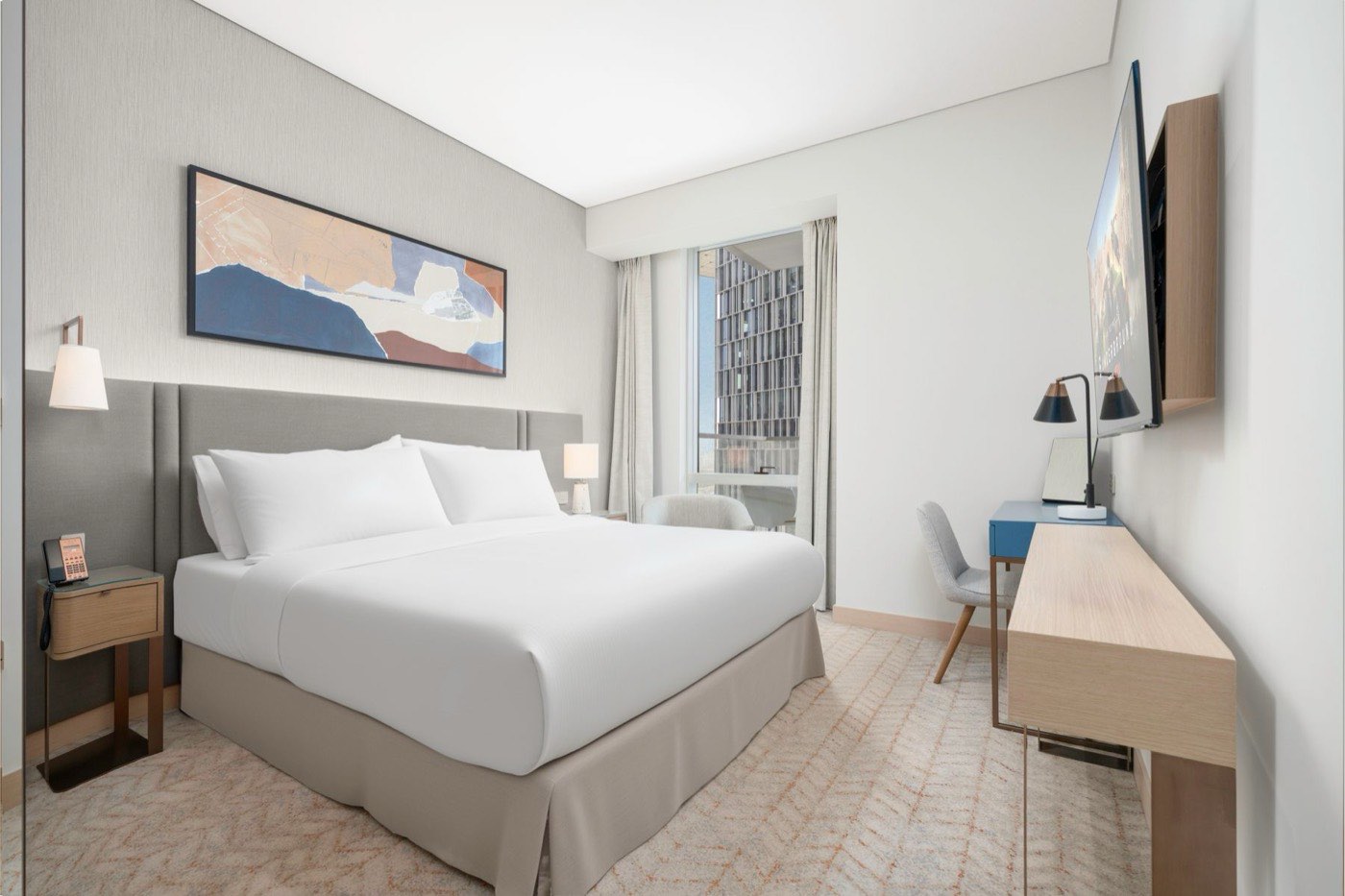
Pins match the rows of the example record. Illustrative interface, fictional hotel and data.
What should a room setup record specify?
For every item that has a defined place, write down five things:
- Item. The exact name, and the model or type if it matters.
- Position. Where it sits, described against a fixed point such as the headboard or the left bedside table.
- Quantity. How many, for the room category and for the occupancy.
- Orientation. Which way it faces, for example the label forward or the handle to the right.
- How to check. What an inspector looks at, and what counts as a pass.
Add an inventory placement image wherever a small detail decides the result. A close photo of the pillow layers or the amenity tray lets a team member match the position exactly. The table shows one record for a fictional hotel.
| Pin | Item | Position | Quantity (example) | Orientation | How to check |
|---|---|---|---|---|---|
| 1 | Sleeping pillows | Against the headboard, centred on each side | 4 | Open end away from the door | Four pillows, all with covers smooth |
| 2 | Bedside telephone | Right-hand bedside table, front corner | 1 | Handset toward the bed | Cord untangled, handset seated |
| 3 | Bedside lamp | Left-hand bedside table, centred | 1 | Switch facing the bed | Lamp works, shade straight |
| 4 | Desk lamp | Back left corner of the desk | 1 | Shades angled to the desk | Lamp works, cable out of sight |
| 5 | Artwork | Centred above the headboard | 1 | Level | No tilt, no dust on the frame |
| 6 | Wall lamp | Left of the headboard | 1 | Shade facing the bed | Lamp works, shade clean |
GDI’s room setup and inventory placement library stores records like this with photos for each room category and numbered markers on each item.
How do you organise room setup standards?
Organise first by room category, then by department. Each category gets one record, with sections for the areas of the room: bed, bedside, desk, bathroom, minibar or coffee area, wardrobe. Inside each area, tag the item with the department that owns it. Housekeeping usually owns linen and amenities, engineering owns lamps and electronics, and food and beverage owns the minibar.
That structure lets one team see only its own items, and lets an inspector view the whole room. A category that changes after a renovation can be updated without touching the others. A consistent naming scheme, for example category, area, item, makes search fast.
How do teams use them for training and room inspections?
In training, a new attendant studies the photo, then sets up a practice room and compares it with the record. The trainer corrects against the same image, so feedback stays consistent from one trainer to the next. Searching by item is useful here: “where does the second throw go?” has one answer.
For inspections, the record becomes the checklist. Supervisors, self-inspections and brand compliance reviews all score the room against the same items, positions and counts. Disagreements about whether a room passes become easier to settle because the reference is visible. If you already use pictorial SOPs, the setup record links naturally to the steps that produce it. See also our guide to pictorial SOPs.
Who updates the standard, and how are changes communicated?
Name one owner for each room category record, usually the executive housekeeper or the brand standards manager, with a second approver for anything that changes the guest experience. Changes usually come from a renovation, a new amenity, a supplier change or a gap found in an inspection.
A change is only finished when the people affected know about it. Good practice is to update the record, replace the photo if the look changed, keep a history of who changed what and when, and notify the teams directly. In GDI’s digital ecosystem, an edit can be sent by email to the users concerned, and the version history lets you revert a mistake.
What are the common mistakes?
- One photo for all room types. A king photo cannot guide a twin or a suite. Photograph every category.
- No acceptance photo. Without a photo of the finished, approved room, inspectors judge by memory. Keep one reference image per area that counts as a pass.
- Out-of-date images. A photo from before the renovation teaches the wrong setup. Retake images when furniture, linen or amenities change, and date every record.
- Positions without a fixed point. “On the left” depends on where you stand. Describe positions from the headboard or the door.
- No owner. A record nobody owns drifts away from the room.
If you would like help writing these records with your teams, see our SOP development service or read the hotel SOP template guide.